Instructions, symbols, and memory-mapped input/output.
Recap
The Hack Memory System
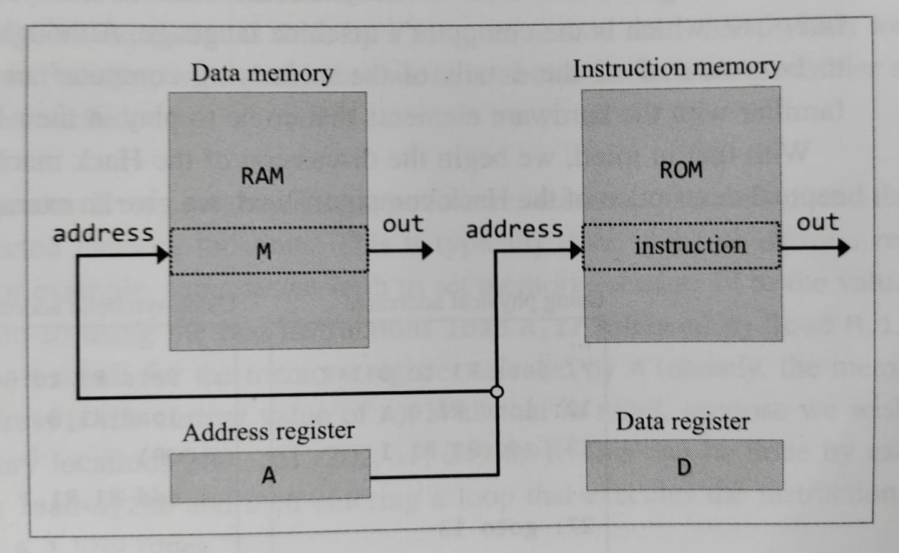
Programmer-visible memory and registers
ROM stores program instructions.
RAM stores program data.
A can hold a value or select an address in RAM or ROM.
D stores and manipulates data.
M denotes the selected data-memory word, RAM[A].
Next: recall what small Hack programs look like.
Recap
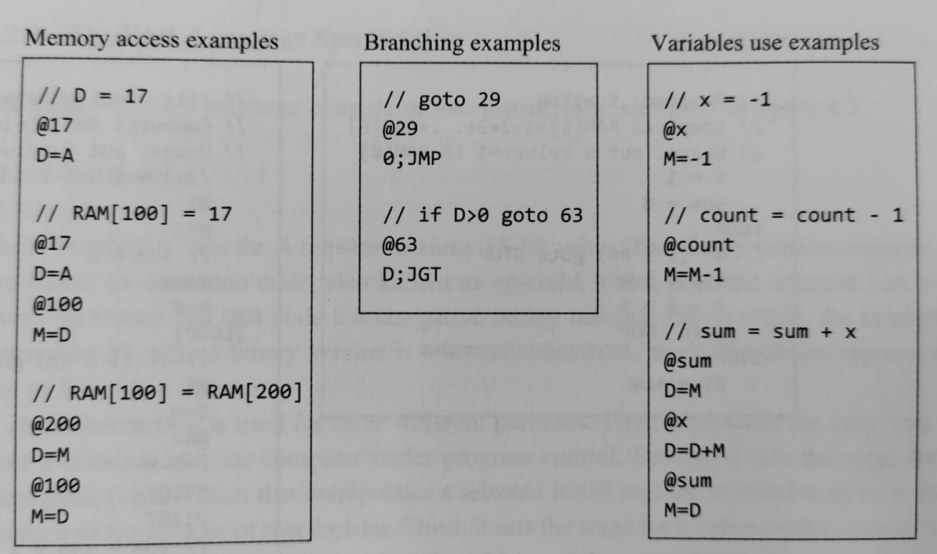
Hack Assembly Examples
Memory access, branching, and variable-use examples
In each example, identify where A is being used as a value, a RAM address, or a jump address.
Worked Example
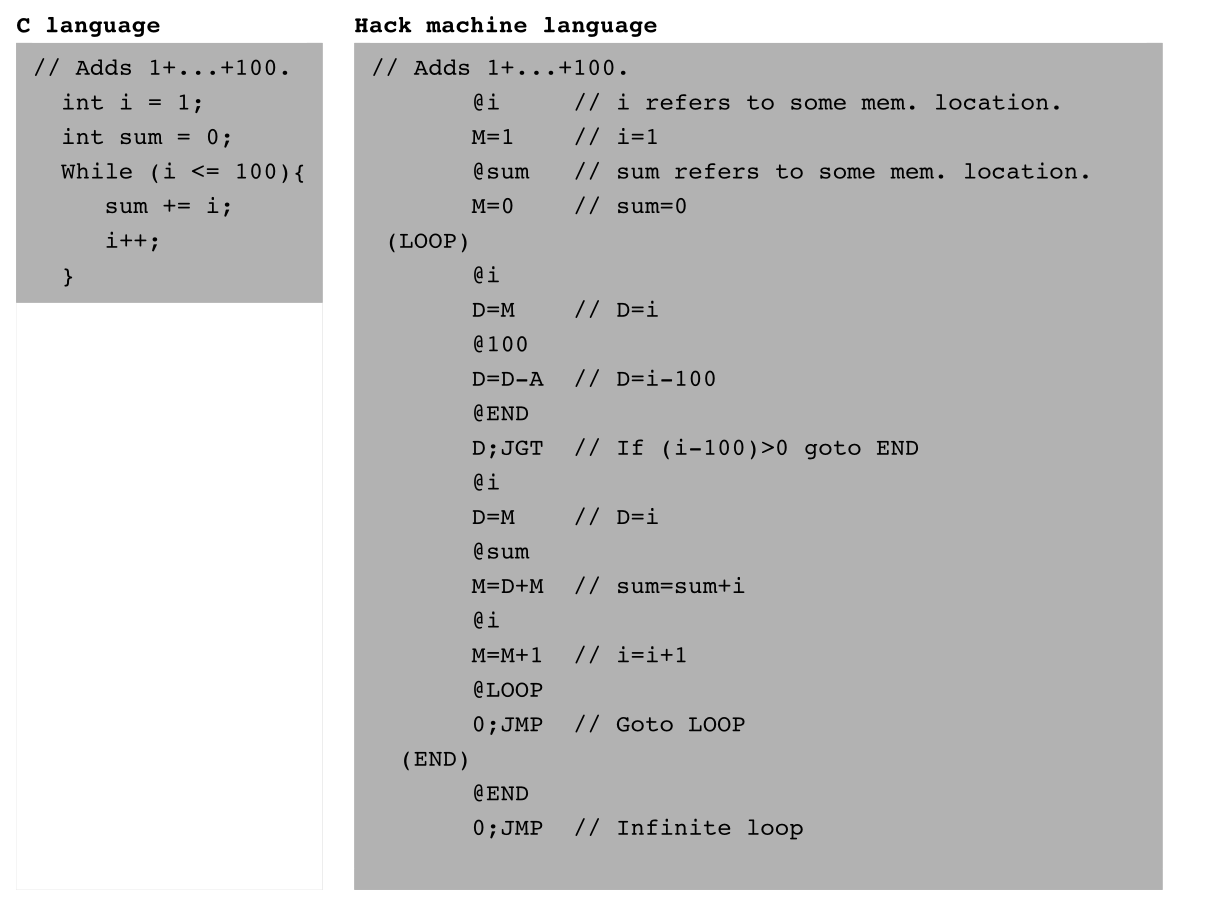
Add the Integers from 1 to 100
Termination convention: In Hack, the program stops running when it enters an infinite loop. The infinite loop at the end is therefore the standard way to “terminate” a Hack program.
High-level algorithm and corresponding Hack assembly
Next: specify the two instruction types used by this program.
A-Instruction
Loading the A Register
@value    // value is a non-negative decimal number
          // or a symbol that refers to such a number
The A-instruction stores the specified value in the A register.
Binary format: one leading 0 followed by a 15-bit value
0000 0000 0000 0111means@7
A-Instruction
Three Uses of @value
Enter a constant.@5 places the binary representation of 5 in A.
Select data memory.
@17    // sets A to address 17
D=M    // copies RAM[A], which is RAM[17], into D
Select a jump destination.
@17    // sets A to address 17
0;JMP  // jumps to address 17 in ROM;
       // the next instruction is read from ROM[17]
The same A register supports three roles; the following instruction determines how its value is interpreted.
Exercise 1
Read and Encode A-Instructions
A
What value does @21 place in A?
21
B
Give the binary form of the A-instruction @17.
0000000000010001
C
Decode 0000000000010001.
@17
D
Does @100 read RAM[100]?
No. It only sets A=100.
Next: introduce the instruction that computes, stores, and jumps.
C-Instruction
Symbolic and Binary Fields
A C-instruction computes a value, optionally stores it, and optionally jumps.
dest=comp;jump
111a cccccc ddd jjj
111
Identifies a C-instruction; the two bits after the leading 1 are reserved and fixed to 1.
a cccccc
comp: what the ALU computes.
ddd
dest: where the result is stored.
jjj
jump: which instruction executes next.
If dest is empty, omit =. If jump is empty, omit ;.
Next: examine each field in order—computation, destination, then jump.
Exercise 2
Separate the Three Fields
For each symbolic C-instruction, identify dest, comp, and jump.
instruction
dest
comp
jump
D=M+1
D
M+1
empty
D;JGT
empty
D
JGT
0;JMP
empty
0
JMP
MD=D-1
MD
D-1
empty
C-Instruction | Computation
The Computation Specification
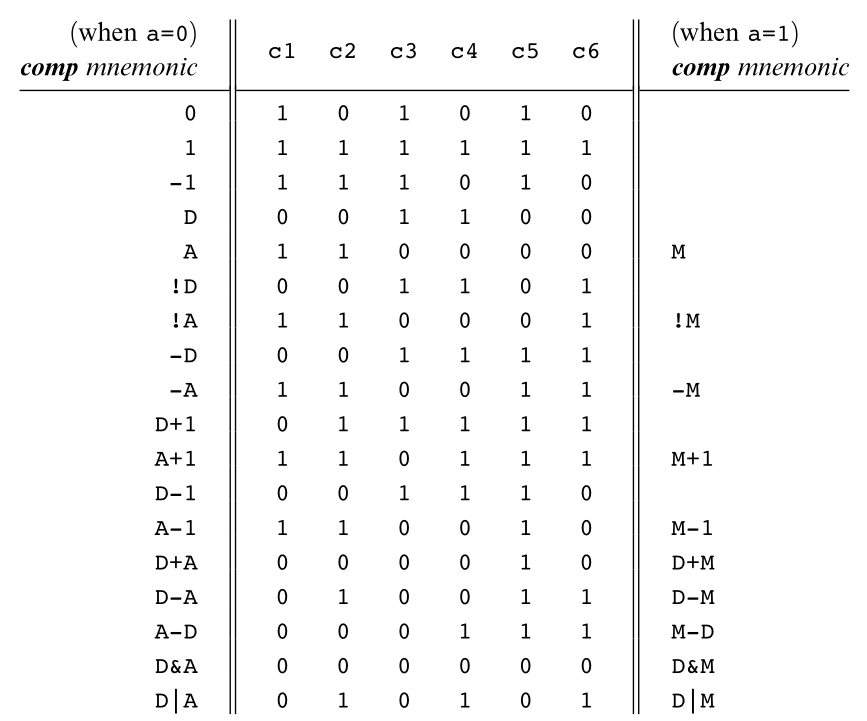
The 28 documented computations
Recall the C-instruction fields
D and A name registers; M denotes Memory[A].
+ and - are 16-bit two's-complement operations.
!, |, and & are bitwise NOT, OR, and AND.
The a-bit chooses A or M; the six c-bits match the Hack ALU controls.
Seven bits could encode 128 patterns, but only these 28 functions are documented.
Example: compute D-1111 0 001110 000 000
The computation field 0 001110 asks the ALU for D-1. Destination and jump are both 000, so the result is neither stored nor used to jump.
C-Instruction | Computation
Encoding Computations
Start with the format 111a cccccc ddd jjj. Here, both destination and jump are empty, so their six bits are 0.
D-1111 0 001110 000 0001110 0011 1000 0000
D|M111 1 010101 000 0001111 0101 0100 0000
-1111 0 111010 000 0001110 1110 1000 0000
Changing A to M in a documented pair changes the a-bit from 0 to 1 while retaining the six ALU-control bits.
Exercise 3
Use the Computation Table
A
Find the seven comp bits for D+A.
0 000010
B
Find the seven comp bits for D+M.
1 000010
C
Is D*2 a documented comp mnemonic?
No
D
Encode !M with empty dest and jump.
1111 1100 0100 0000
Next: decide where the ALU result is stored.
C-Instruction | Destination
The Destination Specification
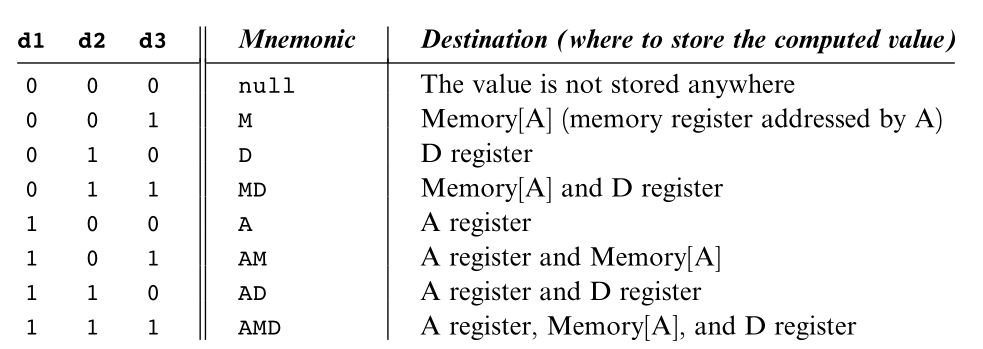
The three destination bits
Recall the C-instruction fields
d1 stores the ALU output in A.
d2 stores it in D.
d3 stores it in M, meaning Memory[A].
Zero, one, or several destination bits may be asserted.
Example: D=A111 0 110000 010 000
The ALU outputs A. Destination bits 010 copy that result into D; jump bits 000 continue with the next instruction.
C-Instruction | Destination
Example: Store One Result in M and D
Increment Memory[7] and store the same result in D.
Assembly
@7
MD=M+1
Binary
0000 0000 0000 0111
1111 1101 1101 1000
@7 sets A=7, so M now denotes Memory[7].
M+1 is computed once.
The destination MD stores that one result in both Memory[7] and D.
Exercise 4
Choose the Destination Bits
desired destination
mnemonic
d1d2d3
D only
D
010
A and M
AM
101
A, D, and M
AMD
111
store nowhere
null
000
Next: use the ALU result to decide which instruction executes next.
C-Instruction | Jump
The Jump Specification
Jump bits and conditions
Recall the C-instruction fields
Normally, execution continues with the next instruction.
For a jump, A must already contain the target instruction address.
The jump condition tests the ALU output produced by the same C-instruction.
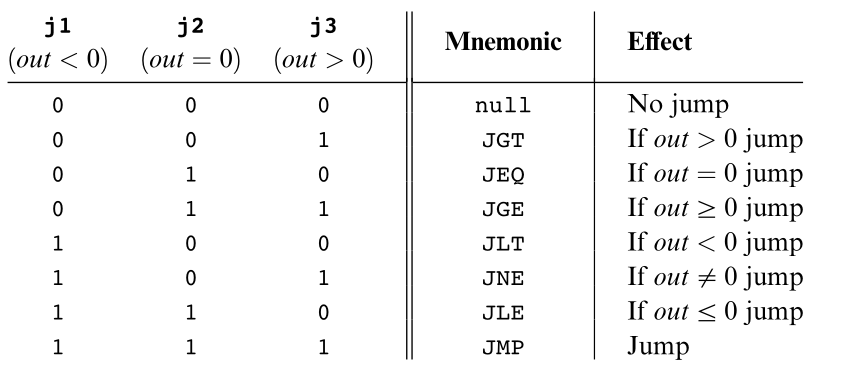
j1, j2, and j3 enable jumps for negative, zero, and positive outputs.
Example: D;JGT111 0 001100 000 001
The ALU outputs D. Jump bits 001 make the computer continue from ROM[A] when D is positive; otherwise it executes the next instruction.
C-Instruction | Jump
Worked Example: Conditional and Unconditional Jumps
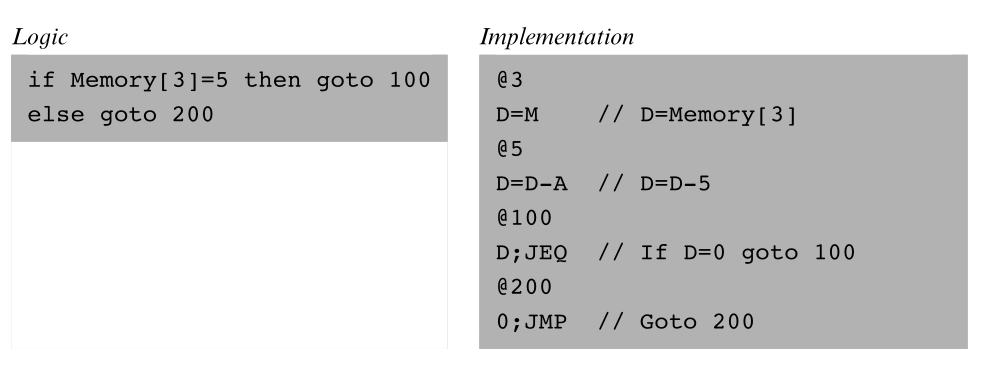
out is the ALU result; a taken jump continues at the instruction address in A
Why 0;JMP?
A C-instruction must specify a computation. For an unconditional jump the result is ignored, so 0 is a simple conventional choice.
Exercise 5
Will the Computer Jump?
Assume A already contains the target instruction address.
instruction
ALU output
jump?
D;JGT
7
Yes
D;JGT
0
No
D;JLE
-3
Yes
0;JMP
0
Yes
The A Register
Avoid Conflicting Uses of A
Data-memory roleA selects Memory[A]
A following instruction involving M treats A as a RAM address.
Jump roleA selects an instruction
A C-instruction with nonzero jump bits treats A as the target instruction address.
Programming rule
To prevent conflict, a well-written C-instruction that may jump should not also refer to M, and an instruction involving M should not also request a jump.
Next: replace hard-coded addresses with meaningful symbols.
Exercise 6
Which Instructions Avoid the Conflict?
D=MSafe: M, no jump
D;JGTSafe: jump, no M
M;JGTAvoid: M and jump
0;JMPSafe: jump, no M
Question
How Does Hack Identify the Instruction Type?
How does Hack know whether an instruction is an A-instruction or a C-instruction?
A-instructionC-instruction
The first bit reveals the type
0 means A-instruction; 1 means C-instruction. Hack can therefore identify the instruction type by inspecting its first bit.
Symbols
Three Ways Symbols Enter a Program
PredefinedKnown before assembly
Names such as R0, SCREEN, and KBD.
LabelsName instruction addresses
Declared using a pseudo-command such as (LOOP).
VariablesName allocated RAM words
New symbols are assigned RAM addresses beginning at 16.
Assembly commands may use a numeric address or a symbol that the assembler resolves to an address.
Symbols | Predefined
Predefined RAM Symbols
group
symbols
RAM addresses
Virtual registers
R0–R15
0–15
Pointers
SP, LCL, ARG, THIS, THAT
0, 1, 2, 3, 4
Input/output
SCREEN, KBD
16384, 24576
Two names may denote one address
For example, R2 and ARG both denote RAM address 2.
Symbols | Labels and Variables
User-Defined Symbols
Label symbol(LOOP)
Names the ROM address of the next real instruction.
The declaration produces no machine instruction.
A label is declared once but may be used before or after its declaration.
Variable symbol@count
A symbol that is neither predefined nor declared as a label.
The assembler assigns it a unique RAM address.
Allocation begins at RAM address 16.
Exercise 7
Classify and Resolve the Symbols
A
@R5
Predefined; RAM address 5
B
@SCREEN
Predefined; RAM address 16384
C
(LOOP)
Label; next ROM instruction address
D
@count, first new variable
Variable; RAM address 16
Next: use ordinary memory access to communicate with devices.
Input and Output
Memory-Mapped Devices
The Hack computer interacts with its screen and keyboard through designated RAM addresses.
Screen outputWrite to its memory map
Changing bits in the screen segment changes pixels on the physical display.
Keyboard inputRead its memory map
The keyboard's current key code appears in a designated RAM word.
Continuous refreshHardware keeps them synchronized
Programs use ordinary memory instructions; no special screen or keyboard instruction is needed.
Input and Output | Screen
The Screen Memory Map
Screen specification
Dimensions
512 × 256 black-and-white pixels
Base address
SCREEN = 16384
Map size
8K 16-bit words
One row
32 consecutive words
Bit value
1 = black, 0 = white
Pixel at row r, column c
Word address:
16384 + r × 32 + floor(c / 16)
Bit within that word:
c mod 16
Input and Output | Screen
Example: Draw the Top-Left Pixel
@SCREEN
M=1
@SCREEN sets A to 16384, the first word of the screen map.
That word controls the 16 left-most pixels of the top row.
M=1 sets its least significant bit to 1, blackening the top-left pixel.
Fun lab task
Draw a picture on the Hack screen by writing suitable bit patterns into the screen memory map.
Exercise 8
Locate Screen Pixels
A
Which RAM word contains row 0, column 17?
RAM[16385]
B
Which bit within that word represents column 17?
Bit 1
C
Which address begins row 1?
16384+32 = 16416
D
What values represent black and white?
1 = black; 0 = white
Input and Output | Keyboard
The Keyboard Memory Map
KBD denotes RAM address 24576.
When no key is pressed, RAM[24576] contains 0.
When a key is pressed, it contains that key's 16-bit code.
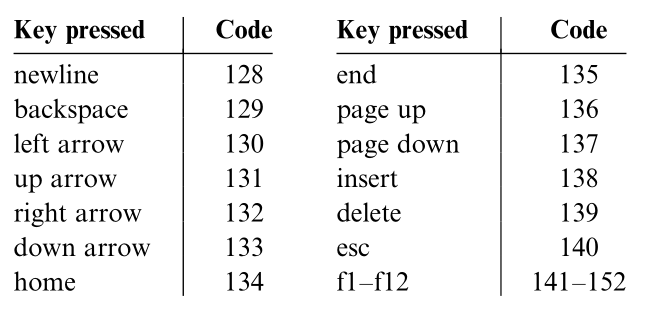
Ordinary characters use their usual codes; special Hack keys use the codes shown.
@KBD
D=M    // D receives the current key code
Special keyboard codes
Fun lab task
Write a program that displays the key currently being pressed on the screen.
Exercise 9
Reason About Keyboard Input
A
After @KBD and D=M, what is D when no key is pressed?
0
B
What is D when the left-arrow key is pressed?
130
C
Which jump tests whether any key is pressed?
After D=M, use D;JNE.
D
Does reading KBD require a special input instruction?
No. It is an ordinary memory read.
Summary of This Lecture
Hack Machine Language
A-instruction
@value loads a constant or address into A.
C-instruction
dest=comp;jump computes, stores, and controls execution.
Symbols
Predefined names, labels, and variables replace numeric addresses.
Input/output
Screen writes and keyboard reads are ordinary memory accesses.